Key Takeaways
- Snowflake, BigQuery and Redshift are the easiest managed warehouses, and Databricks is the stronger choice for engineering, streaming and machine learning.
- Microsoft Fabric makes the most sense if you already run on Power BI and Azure, and Redshift fits teams centered on AWS.
- Pricing is usage-based almost everywhere, so a two-week test on your own data tells you more than any price list.
- Start with the smallest platform that answers your top questions, and avoid buying for the company you may become.
The Best Data Platform Tools at a Glance
| Tool | Type | Best for |
|---|---|---|
| 1. Snowflake | Cloud data platform | Teams that want a managed warehouse with little tuning |
| 2. Databricks | Lakehouse platform | Teams with heavy engineering, streaming and machine learning |
| 3. Google BigQuery | Serverless warehouse | Google Cloud teams that want serverless SQL |
| 4. Microsoft Fabric | Unified analytics platform | Microsoft shops that use Power BI |
| 5. Amazon Redshift | Cloud warehouse | AWS-centered teams |
| 6. ClickHouse Cloud | Real-time analytics database | Real-time dashboards and event analytics |
| 7. Cloudera | Hybrid data platform | Hybrid organizations with on-premises data |
| 8. Teradata VantageCloud | Enterprise analytics platform | Large enterprises with existing Teradata estates |
The 8 Best Data Platform Tools, Ranked
I rank these by how often I would put them in front of a mid-sized company, starting with the platforms that most teams can adopt without a large engineering group. The platform is only part of the result: in data platform consulting projects, design, testing and cost control decide more than the logo on the invoice. If you are still working out what you need, my guide to data platform strategy comes first.
Snowflake
A Fully Managed Cloud Platform That Keeps Storage and Compute Separate and Needs Little Tuning
Snowflake is a cloud data platform where you store data once and run as much or as little compute against it as you need.
Snowflake is the platform I most often see at the center of a mid-sized company’s data stack. Storage and compute scale separately, so a heavy nightly load does not slow down the finance team running reports. You write standard SQL, and tasks such as index tuning and partition management mostly disappear, which is why small data teams like it.
The catch is the bill. Compute is billed in credits, and a warehouse left running or a badly written query can burn a surprising amount. In my client work, the first month on Snowflake pays for itself in saved admin time, and the second month is when someone has to set resource monitors and auto-suspend. It also supports data sharing, so you can give a partner live access without copying files.
Pros of Snowflake
- Separate storage and compute make scaling simple
- Very little administration compared with older warehouses
- Data sharing gives partners live access without copies
Cons of Snowflake
- Credit-based billing needs active monitoring
- Costs can climb for constant, always-on workloads
Snowflake Pricing
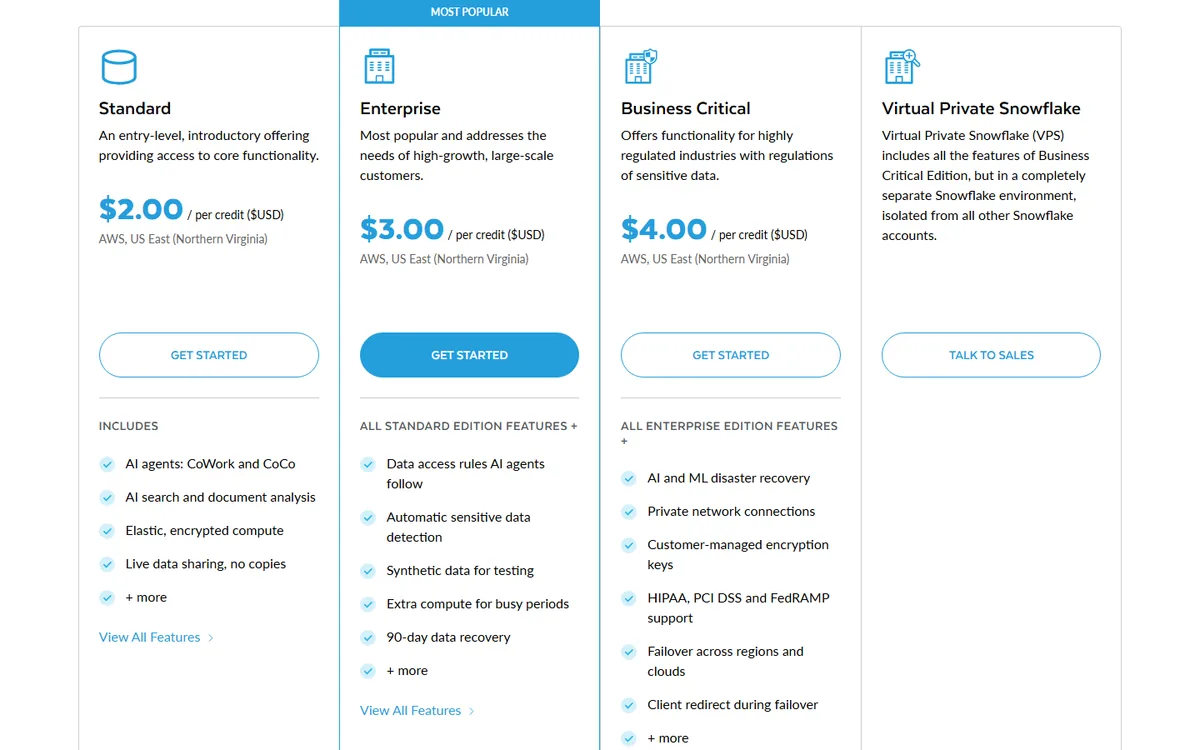
Snowflake uses consumption pricing. You pay for compute in credits, for storage by the terabyte per month on compressed data, and for data transfer. Four editions exist: Standard, Enterprise, Business Critical and Virtual Private Snowflake. The credit price depends on the edition, the cloud and the region, and Snowflake publishes it in its service consumption table, so check that before you budget. Capterra lists storage from about $23 per month per terabyte, and Snowflake offers a free trial.
Snowflake Reviews
- G2: 4.6/5 average (from 779 reviews)
- Capterra: 4.7/5 average (from 101 reviews)
Databricks
The Strongest Choice When Data Engineering, Streaming and Machine Learning Share One Platform
Databricks combines Apache Spark processing, a lakehouse storage layer and notebooks in one platform for engineering, analytics and machine learning.
Databricks started as the company behind Apache Spark, and it is still the platform I recommend when large-scale processing, streaming or machine learning is a core need. Engineers write jobs in Python, SQL or Scala, run them on managed compute and store results in open table formats, so analysts and data scientists work on the same copy of the data.
It rewards teams with engineering depth and punishes casual setups. A SQL-only analytics team may find it heavier than a plain warehouse. When I have seen it work best, one platform replaced a separate lake, a separate warehouse and a separate machine learning environment, which cut the number of copies of the data and the arguments about which one was right.
Pros of Databricks
- Handles batch, streaming and machine learning in one place
- Open table formats reduce lock-in
- Notebooks, jobs and SQL sit close together
Cons of Databricks
- A steeper learning curve than a SQL-only warehouse
- Cost estimates need care because cloud fees are billed separately
Databricks Pricing
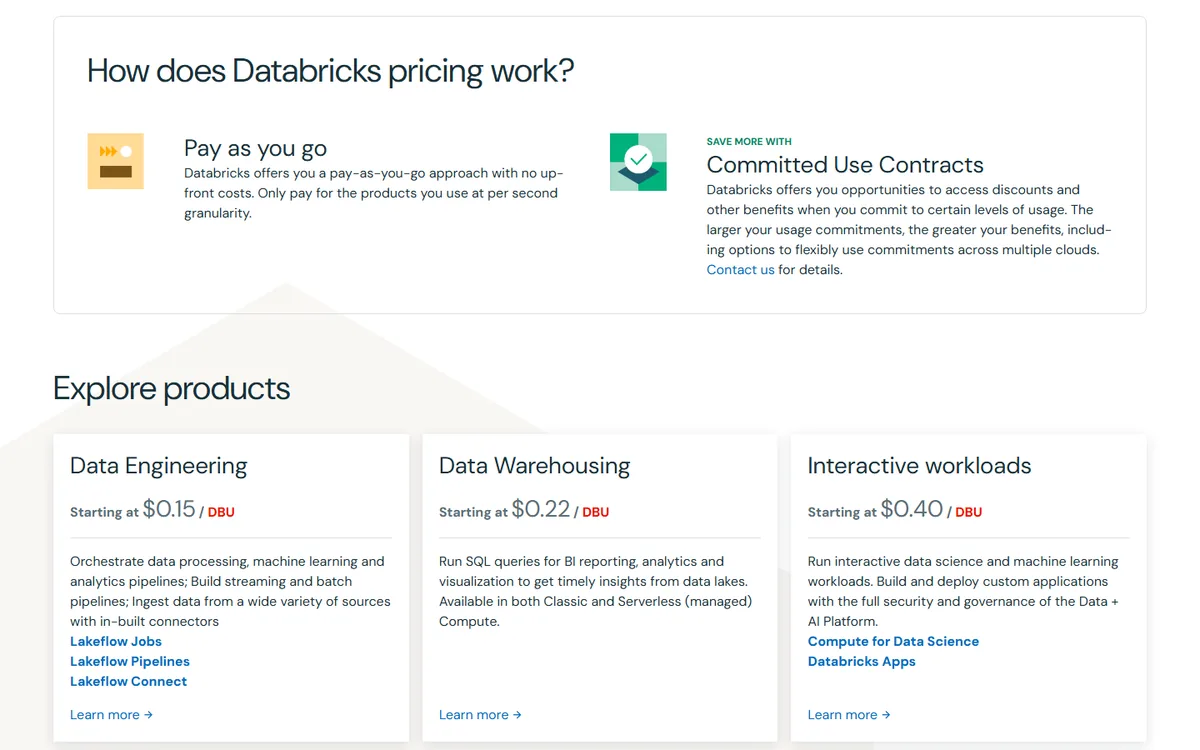
Databricks bills on usage, measured in Databricks units (DBUs) with per-second granularity and no up-front costs. The price per DBU depends on the product, the cloud and the region, and the exact rates sit in Databricks’ price list and calculator. Larger commitments can earn discounts, and some trials include credits. Remember that the cloud provider bills storage and virtual machines separately.
Databricks Reviews
- G2: 4.6/5 average (from 1,405 reviews)
- Capterra: 4.5/5 average (from 23 reviews)
Google BigQuery
A Serverless Warehouse for Teams That Want to Run SQL Without Managing Any Infrastructure
BigQuery is Google Cloud’s serverless data warehouse, where you load data and query it with SQL without sizing clusters.
BigQuery is the easiest warehouse to start with if you already use Google Cloud, Google Analytics or Looker. There are no servers or clusters to size. You load data, write SQL and pay either for the data each query scans or for reserved slots. For small teams that is a real saving in effort, and loading data from Google Ads and Analytics is close to built in.
The risk is scan-based billing. One careless query against an unpartitioned table can scan terabytes, and I have seen a single dashboard refresh triple a monthly bill. Partitioning, clustering and per-query cost limits turn that risk into a non-issue, and the editions pricing gives steadier costs for heavy, predictable workloads.
Pros of Google BigQuery
- No infrastructure to manage and fast to start
- Tight links to Google Analytics, Ads and Looker
- On-demand and reserved pricing fit different workloads
Cons of Google BigQuery
- Scan-based billing punishes careless queries
- Cost and performance tuning differs from other warehouses, so skills transfer less
Google BigQuery Pricing
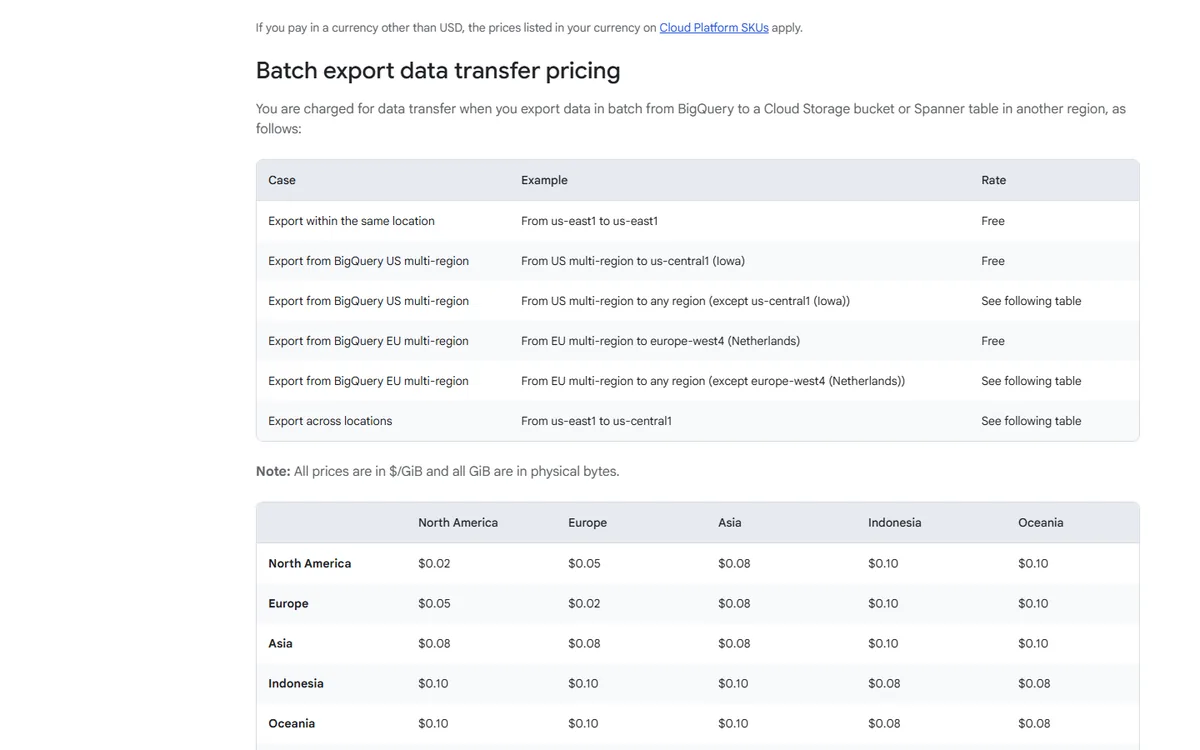
On-demand compute costs $6.25 per TiB of data processed, and the first 1 TiB each month is free. Storage costs about $0.023 per GiB per month for active logical storage and about $0.016 for long-term storage after 90 days without changes, with the first 10 GiB free. Capacity pricing uses slot-hours: in the Iowa region, Standard edition is $0.04, Enterprise $0.06 and Enterprise Plus $0.10 per slot-hour pay-as-you-go. Prices vary by region.
Google BigQuery Reviews
- G2: 4.5/5 average (from 1,239 reviews)
- Capterra: 4.6/5 average (from 37 reviews)
Microsoft Fabric
The Natural Pick for Microsoft Shops That Want Data, Engineering and Power BI Under One Roof
Microsoft Fabric bundles data engineering, a warehouse, real-time analytics and Power BI on one storage layer called OneLake.
Fabric is Microsoft’s attempt to put the pieces of a modern data platform in one product. A single capacity pool powers data pipelines, notebooks, a SQL warehouse, real-time analytics and Power BI, and all of it reads from OneLake. If your company already runs on Microsoft 365, Azure and Power BI, the shared sign-in, security and billing are a big plus.
It is the newest platform in this list, and I treat it that way. Features keep arriving, and some corners are less mature than the older tools. In projects I have seen, teams do best when they pick the parts they need first, such as the warehouse and Power BI, and leave the rest for later.
Pros of Microsoft Fabric
- One capacity powers engineering, warehouse and BI
- Fits an existing Microsoft and Power BI setup
- OneLake keeps data in open formats
Cons of Microsoft Fabric
- Newer product, so some features are less mature
- Capacity sizing takes trial and error
Microsoft Fabric Pricing
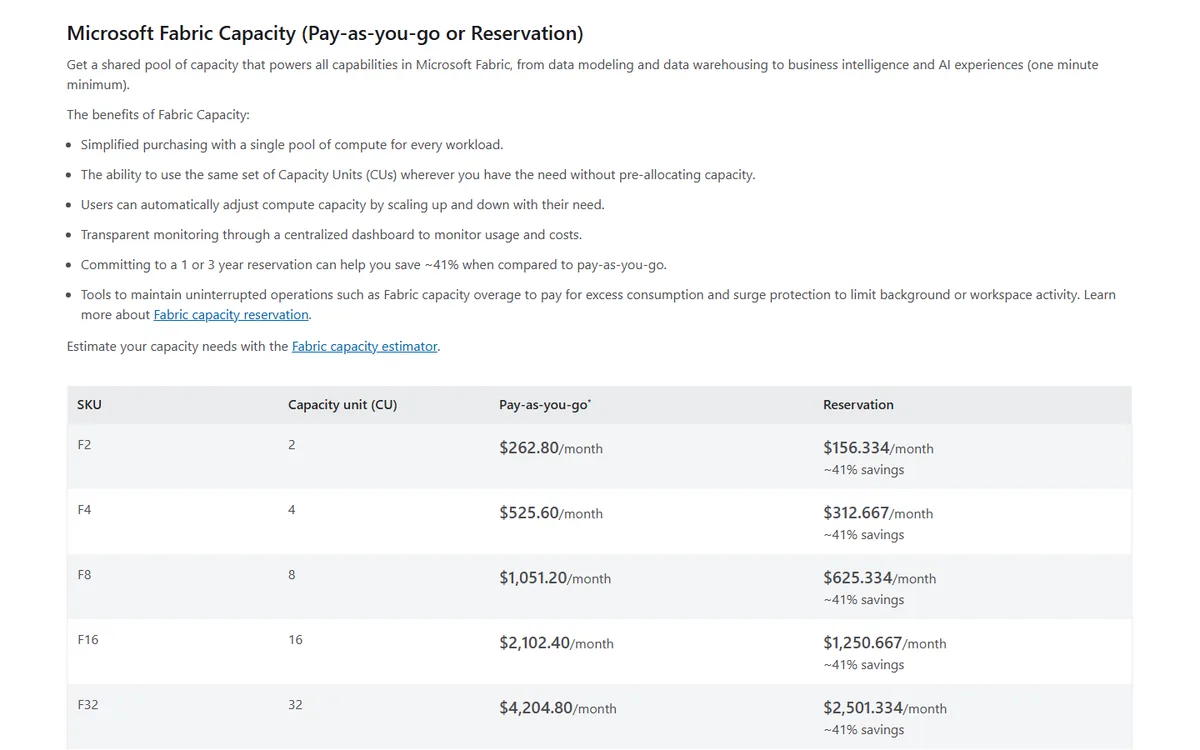
Fabric is sold as capacity, in F SKUs, and you pay for the capacity size you reserve. Microsoft’s page says a one-year or three-year reservation can save about 41% compared with pay-as-you-go, and a 60-day free trial is available. The per-SKU rates and OneLake storage rates are shown in the Azure pricing calculator, so run your own numbers there.
Microsoft Fabric Reviews
- G2: 4.6/5 average (from 47 reviews)
Amazon Redshift
A Mature Warehouse That Fits Best When the Rest of Your Data Already Lives in AWS
Amazon Redshift is AWS’s data warehouse, available as provisioned clusters or as a serverless option.
Redshift is the right default when your sources, storage and other tools are already in AWS. It plugs into S3, Glue, Kinesis and the rest of the AWS family, and IAM handles access. The serverless option removes most cluster sizing, so a small team can get started without choosing node types.
Compared with Snowflake or BigQuery, it asks a bit more of you. Tuning choices such as distribution and sort keys still matter on provisioned clusters, and concurrency scaling needs watching. I have moved clients both onto and away from Redshift, and the deciding factor is almost always how much of the surrounding stack is already on AWS.
Pros of Amazon Redshift
- Deep integration with S3, Glue and other AWS services
- Serverless and provisioned options in one product
- Mature, widely known by engineers
Cons of Amazon Redshift
- More tuning than fully managed rivals on provisioned clusters
- Strongest inside AWS, less attractive across several clouds
Amazon Redshift Pricing
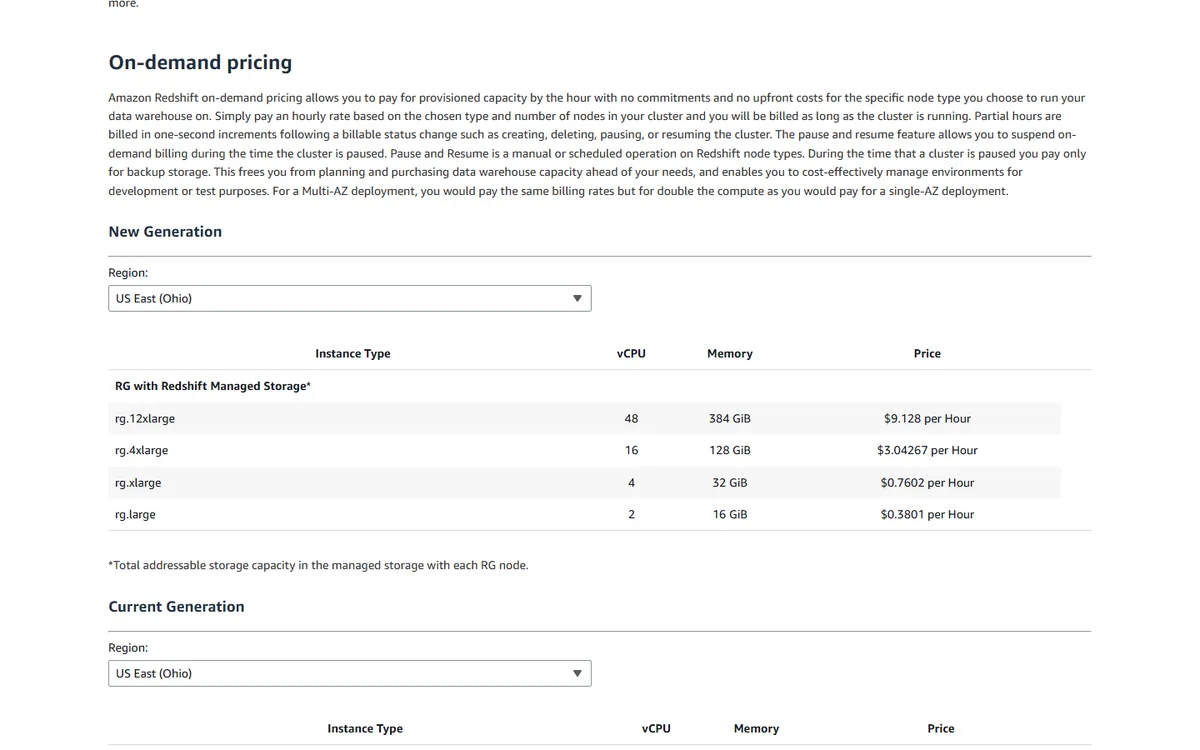
Redshift Serverless costs $0.375 per RPU-hour in the US East (N. Virginia) examples on AWS’s pricing page. Provisioned pricing starts at $0.543 per hour, and managed storage is $0.024 per GB-month in US East (N. Virginia). New serverless users get a $300 credit that expires after 90 days, and provisioned clusters have a separate two-month trial.
Amazon Redshift Reviews
- G2: 4.3/5 average (from 419 reviews)
ClickHouse Cloud
A Very Fast Analytics Database for Real-Time Dashboards and Large Event Data
ClickHouse is a column-oriented analytics database known for very fast queries on large volumes, offered as a managed cloud service.
ClickHouse is a different kind of platform. It excels at fast, high-volume analytics, such as product usage events, logs and real-time dashboards, where a conventional warehouse feels slow or gets expensive. Data is stored in compressed columns, and queries that scan billions of rows come back quickly.
It is less of a general-purpose business warehouse. Complex joins and frequent updates take more care, and the SQL has its own dialect. I recommend it as a second system for event data, or as the main engine when your product itself shows analytics to customers.
Pros of ClickHouse Cloud
- Very fast queries on large event datasets
- Strong compression keeps storage costs down
- Managed cloud removes cluster operations
Cons of ClickHouse Cloud
- Joins and updates need more design care
- SQL dialect and concepts differ from classic warehouses
ClickHouse Cloud Pricing
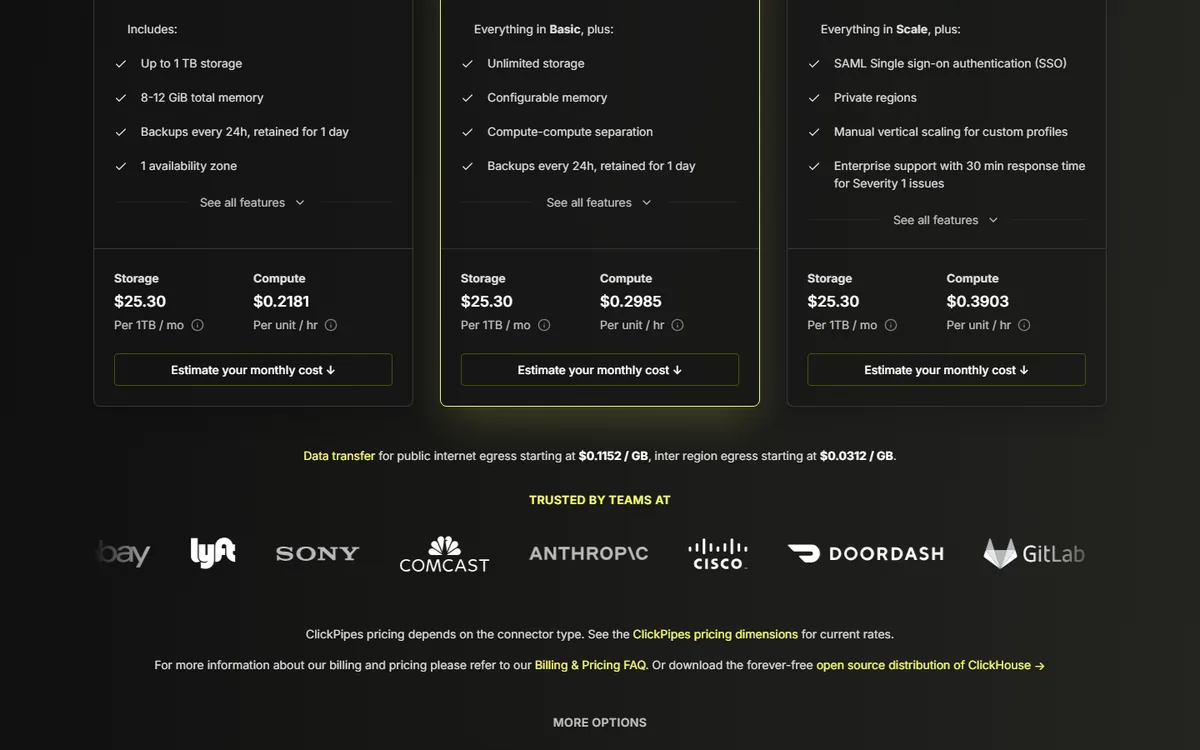
ClickHouse Cloud has three plans, Basic, Scale and Enterprise. Compute is billed per compute unit per hour at $0.2181, $0.2985 and $0.3903 respectively, and storage is $25.30 per TB per month on compressed data. A compute unit is 2 vCPUs and 8 GiB of RAM. New organizations get $300 in credits valid for 30 days, and rates vary by cloud and region.
ClickHouse Cloud Reviews
- G2: 4.3/5 average (from 57 reviews)
Cloudera
A Hybrid Platform for Organizations That Must Keep Part of Their Data On-Premises
Cloudera is a hybrid data platform that runs in the public cloud and in your own data centers.
Cloudera earns its place when you cannot move everything to a public cloud. Banks, telecoms and public bodies often need part of their data on-premises, and Cloudera offers one set of tools and governance across both. It grew from the Hadoop era and covers data engineering, a warehouse, machine learning and streaming.
For a greenfield company with no on-premises estate, I would not start here. It brings more moving parts than a managed cloud warehouse, and your team needs the skills to run them. For the right organization, the hybrid story is the product.
Pros of Cloudera
- Runs the same tools in cloud and on-premises
- Broad coverage from streaming to machine learning
- Built-in security and governance features
Cons of Cloudera
- More complex to run than managed cloud warehouses
- Less attractive for a company with no on-premises needs
Cloudera Pricing
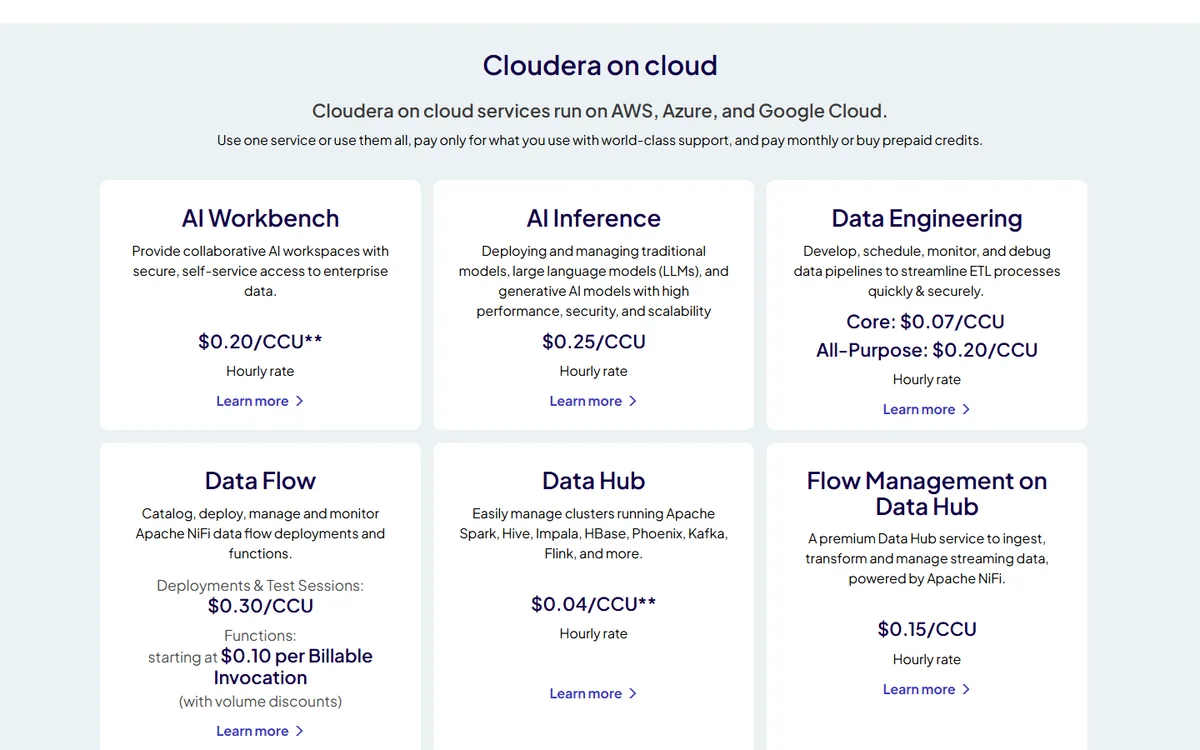
Cloudera prices cloud services per Cloudera Compute Unit (CCU) per hour, and these listed rates exclude your cloud provider’s infrastructure costs. Sample rates are $0.07 per CCU for Data Warehouse, $0.07 (core) or $0.20 (all-purpose) for Data Engineering and $0.08 for Operational Database. On-premises offerings use annual subscriptions, and you contact sales for those prices. The pricing page does not mention a free trial.
Cloudera Reviews
- G2: 4.2/5 average (from 220 reviews)
Teradata VantageCloud
A Long-Established Platform for Very Large, Mixed Enterprise Workloads Across Cloud and On-Premises
Teradata VantageCloud is an enterprise analytics platform with a long history in large-scale warehousing, now offered in the cloud and on-premises.
Teradata has served large retailers, banks and manufacturers for decades, and it still handles very large, mixed workloads with many concurrent users. VantageCloud brings that engine to the cloud, and the company also offers deployments on-premises and in customer-managed clouds.
It usually appears in my projects as the system a client already has, and the question is how to modernize around it. If you already run Teradata, the path is often a gradual move of workloads. For a company starting fresh, the sales-led model and enterprise focus make the other tools here simpler to adopt.
Pros of Teradata VantageCloud
- Proven on very large, concurrent enterprise workloads
- Deployment options across cloud, customer-managed cloud and on-premises
- One unit of measure across compute, storage and software
Cons of Teradata VantageCloud
- Sales-led buying, with no public price list
- Heavier to adopt than lighter cloud-native tools
Teradata VantageCloud Pricing
Teradata uses a Fixed plus Flex model: Fixed is a committed baseline for steady workloads, and Flex is on-demand capacity. Everything is measured in one currency, the Teradata Unit, across compute, storage, software and AI. The company says pricing varies with deployment, workload, capacity, usage and package, and there are no published rates, so use its estimate tool or ask for a quote.
Teradata VantageCloud Reviews
- I could not confirm a current score, so check the live G2 listing.
Estimate the Return on a Data Platform Tool
Before you pick a plan, check whether the numbers work for you. Enter the manual hours a platform could remove, such as hand-built reports and data pulls, and the monthly price you expect to pay, and you will see what it could return in a year. The full set of cost factors is in my article on data platform cost.
Will the Tool Pay Off for You?
Move the sliders to match the work you want to automate and the plan you are considering.
How to Choose the Right Data Platform Tool
In my experience, your cloud, your team’s skills and your workload decide more than any feature list. Before you compare vendors, I suggest you answer four questions:
- Which cloud do your sources and other tools already live in?
- Does your team write SQL, Python or both, and who will run the platform?
- Is your workload steady, bursty or real-time, and how does the platform bill for it?
- Can you keep your data in open formats so you can leave later?
If you have one cloud and a SQL-first team, a managed warehouse is the quickest path. If you run heavy machine learning or streaming, a lakehouse earns its complexity. Whatever you pick, plan the rollout with the steps in my guide to data platform implementation, and look at data platform examples from companies that went before you.
Questions About Choosing a Data Platform
What Is the Best Data Platform for a Small Business?
For most small teams I suggest a managed warehouse such as BigQuery or Snowflake with a loader and dbt on top. You skip server management, you can start on a free tier or trial and you pay mostly for what you use. Choose the one that matches the cloud you already use.
Snowflake or Databricks: Which One Should I Choose?
Choose Snowflake when most of your work is SQL, reporting and sharing data. Choose Databricks when engineering, streaming and machine learning are central and your team is comfortable with code. Many large companies run both, but that doubles the skills you need.
Is a Data Lakehouse Better than a Data Warehouse?
Not always. A lakehouse suits mixed workloads, with BI and machine learning on one copy of the data. A warehouse is simpler when your data is mostly structured and your users write SQL. I start most clients on a warehouse and add lake storage when a real need appears.
How Much Does a Data Platform Cost per Month?
It depends on data volume, number of users and how long compute runs. Small teams can start on trial credits and free tiers, while large platforms reach five or six figures a month. My guide to data platform cost walks through the line items and a worked example.
Which Data Platform Is Cheapest?
There is no single cheapest one. BigQuery on-demand is cheap for light, occasional use, a reserved capacity is cheaper for steady heavy use, and Snowflake with auto-suspend can be cheap for bursty work. Run a two-week test with your own queries before you decide.
Can I Switch Platforms Later?
Yes, but plan for it. Keep raw data in open formats, write business logic in SQL under version control and avoid vendor-specific features where you can. Those habits make a later migration a matter of weeks instead of months.
Do I Need a Consultant to Choose a Data Platform?
Not always, but a neutral view saves money when the decision is large. A short engagement that scores two or three options on your own data often pays for itself in avoided licenses and a cleaner design.
Heads up: vendors change prices, plans and ratings often. Everything was checked at the last update date, but confirm on each vendor’s website first. This article is not legal or financial advice.
Was this article helpful?
Thank you for letting us know.
Camille leads the Trevio editorial team and works with our consultants to turn real client projects into practical guides on data strategy, engineering and governance. Before joining Trevio, she spent 11 years in data engineering and analytics roles. She has since edited more than 300 articles on data management and reviewed pipelines and platforms from over 100 client projects. She is based in Denver, Colorado.